
Save playbooks
Turn every at-risk account
into a repeatable save.
Veermo save playbooks launch a timed sequence of tasks and messages the moment an account crosses a risk threshold, so your team follows the same proven steps every time.
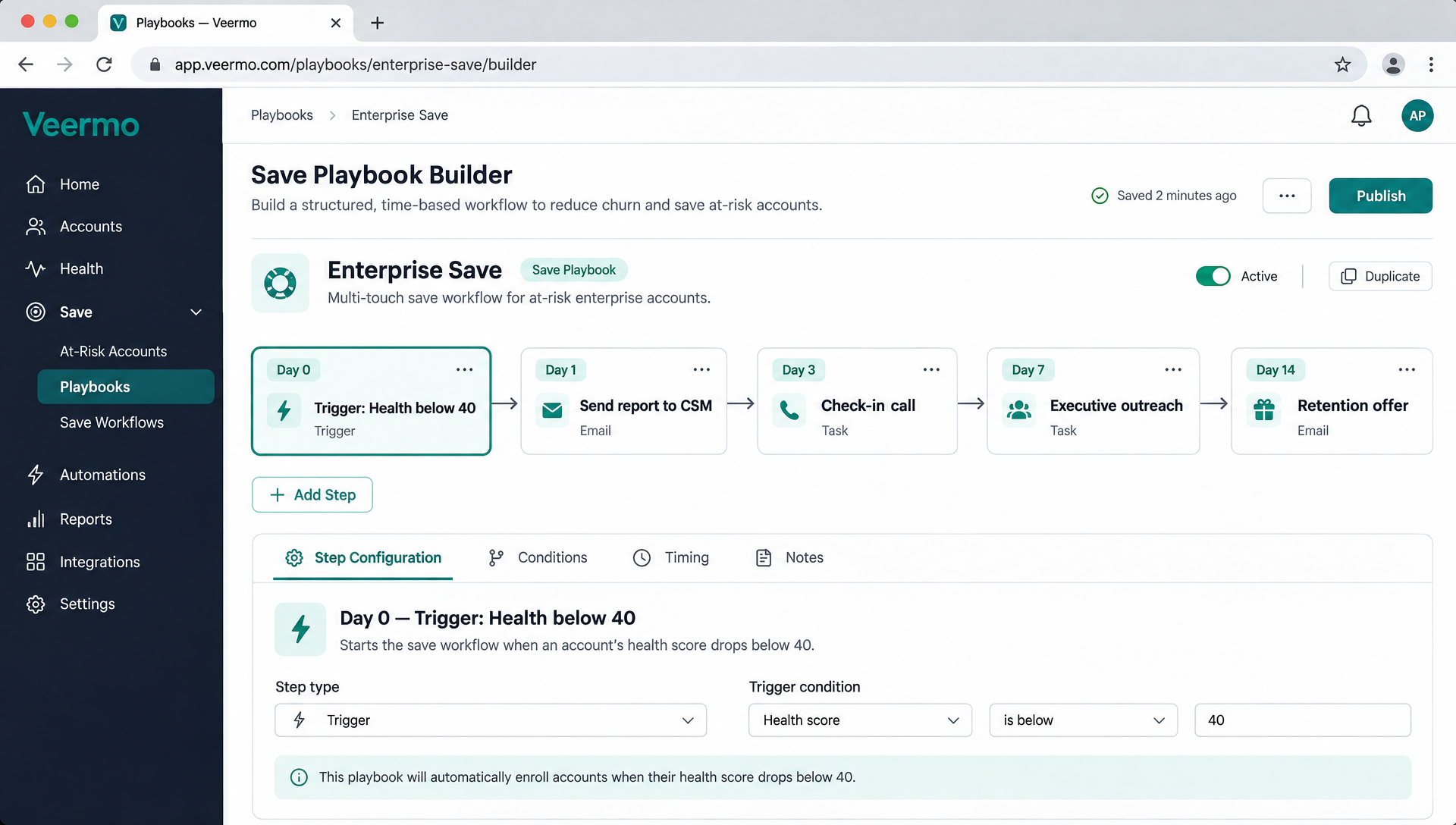
Visual builder
Build a playbook in minutes, not meetings.
Pick a trigger, add the steps your team should follow, set the timing and assign owners. Veermo runs the sequence automatically when an account crosses the threshold.
No code, no workflow diagrams to maintain. Change a step and the next triggered account picks up the new version.
Sample playbook
What a save looks like in practice
Here is a typical enterprise save playbook. Every step fires on schedule, assigned to the right person, with the context they need.
- Day 0: Trigger firesHealth score drops below 40. Veermo assigns the playbook and notifies the account owner in Slack.
- Day 1: DiagnoseCSM reviews the health report: which signals moved, when the decline started, what changed in usage.
- Day 3: Personal outreachCSM sends a check-in email referencing the specific product area where engagement dropped.
- Day 7: Escalate if neededIf health has not recovered, the playbook assigns an executive sponsor call and drafts the agenda.
- Day 14: Retention offerFor accounts still at risk, the playbook prompts a retention conversation with pre-approved terms.
Triggers and actions
Start a playbook from any risk signal
| Trigger | When it fires | Example actions |
|---|---|---|
| Health score drop | Score falls below a threshold you set | Slack alert, CSM check-in email, usage review task |
| Risk level change | Account moves from Healthy to Watch or Watch to High | Executive sponsor outreach, QBR scheduling |
| Usage decline | Active seats or logins drop by a percentage over 14 days | Product walkthrough invite, feature adoption campaign |
| Renewal approaching | Renewal is within 90 days and health is below threshold | Retention offer, contract review, champion meeting |
| Support spike | Ticket volume or escalations increase sharply | CSM triage call, engineering escalation, status update |
Beyond churn saves
Playbooks for every stage of the account lifecycle
Onboarding recovery
If a new account has not completed setup after 7 days, trigger a guided onboarding sequence: a walkthrough invite, a check-in call and a configuration review, timed to catch disengagement before it becomes a habit.
Expansion plays
When an account’s usage outgrows their plan (seats near limit, features maxed out), trigger an expansion playbook: a value summary, an upsell conversation and a proposal, timed so the CSM reaches out before the customer hits a wall.
“As a founder wearing ten hats, I can’t watch every account. Veermo pings me in Slack when something slips, and that’s saved us three times already.”
Priya Sharma
CEO, Archetype
FAQ
Common questions about save playbooks
What triggers a save playbook?
A playbook triggers when an account crosses a risk threshold you define, such as a health score dropping from Healthy to Watch or from Watch to High. You choose the conditions.
Can I have different playbooks for different segments?
Yes. You can create separate playbooks for enterprise accounts, mid-market customers or specific risk patterns, each with its own sequence and timing.
How do playbooks relate to health scores and alerts?
Health scores identify which accounts are at risk. Alerts notify the account owner. Playbooks go further by assigning the specific tasks and messages that follow the alert.
Can I change a playbook while it is running?
Changes to a playbook apply to future triggers. Accounts already in a running sequence continue with the version that was active when they entered.
Stop improvising saves. Start running them.
Connect your data today and see which accounts need a playbook by tomorrow morning.